
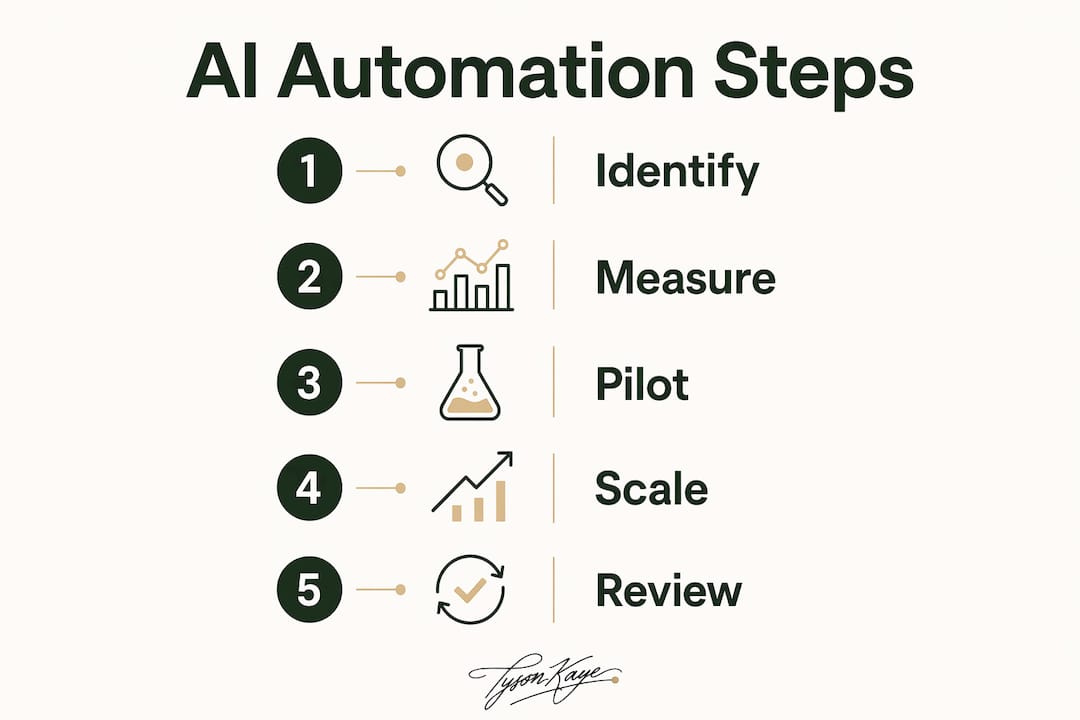
Pilot one high-friction workflow with AI automation this week, measure results at 30, 60 and 90 days, then scale what works. That single discipline, applied consistently, is how Australian service SMBs cut administrative costs without gutting the quality of their client work. Tools like Xero, Zapier, and Microsoft Power Automate are already available to you. The guardrail is the Australian Privacy Principles — know them before you automate anything touching personal data.
Your one-week action checklist:
- Pick one high-friction, repetitive workflow (new client intake, invoice reconciliation, or appointment reminders).
- Map every step: who touches it, which systems are involved (CRM, Xero/MYOB, calendar), and where handoffs break down.
- Record baseline hours and cost for two weeks using a stopwatch or a free time-tracker.
- Choose an integration approach: Zapier, Make (formerly Integromat), or Microsoft Power Automate.
- Assign a pilot owner who is accountable for the 30/60/90-day scorecard.
Expected short wins from a well-scoped pilot:
- Several hours per week recovered from manual data entry and follow-up chasing
- Fewer dropped leads due to automated intake and CRM sync
- Faster invoice turnaround when timesheet data flows directly into Xero or MYOB
- A cleaner escalation path when exceptions need a human decision
Table of Contents
- Why does administrative overhead quietly drain your margins?
- How do you find and measure your administrative overhead?
- Which workflow should you automate first?
- What automation tools work for Australian service businesses?
- What does a 90-day pilot roadmap look like?
- What are the risks and compliance considerations in Australia?
- What results have Tyson Kaye clients actually achieved?
- Tyson Kaye builds the systems so you do not have to
- Key takeaways
- Why starting small is the only move that actually works
- Useful sources
Why does administrative overhead quietly drain your margins?
Administrative overhead covers every dollar and hour spent on operations that do not directly deliver your service. For a consultancy, a trades business, or a healthcare practice, that means scheduling, billing prep, compliance paperwork, and internal reporting. Industry guidance classifies management and back-office functions as overhead precisely because they consume resources without producing billable output.
The compounding effect is the real problem. Repetitive tasks like double data entry or manual scheduling look small individually, but aggregate into outsized overhead across a team. A five-person service firm where each person spends four hours a week on admin is losing 20 hours of potential billable time every week.
Common hidden overheads for Australian service SMBs:
- Double data entry between a CRM (e.g. HubSpot) and accounting software (Xero or MYOB)
- Manual appointment reminders and follow-up emails
- Email triage and inbox routing that should be rule-based
- Reporting assembled by hand from multiple disconnected tools
Freeing even half those hours converts directly into faster client response times, more capacity to take on work, and improved cash flow when invoices go out sooner. Agentic AI takes this further by orchestrating work across systems and routing exceptions to humans, rather than simply automating one task at a time.
How do you find and measure your administrative overhead?
Map the as-is workflow first, then measure time per task for one to two weeks before touching any software. That baseline is what makes your ROI case defensible.
Workflow mapping checklist:
- List every person who touches the process and their role.
- Note every system involved: CRM, accounting (Xero/MYOB), calendar, email.
- Mark every handoff and every point where rework or chasing occurs.
- Identify where tribal knowledge lives (steps only one person knows how to do).
KPI table for your pilot baseline:
| KPI | What to measure | How to collect |
|---|---|---|
| Hours per week | Total staff time on the workflow | Time-tracker or manual log |
| Cost per task | Hourly rate × average task time | Payroll data + time log |
| Error/rework rate | Tasks requiring correction | Tally in a spreadsheet |
| Turnaround time | Start to completion in hours/days | Timestamps in your CRM or inbox |
| First-pass success | Tasks completed without rework | Tally against total tasks |
Simple ROI calculation: if a team member earning $45/hr spends six hours a week on manual invoice reconciliation, that is $270/week or roughly $14,000/year. Industry research shows that automating this workflow with a suitable tool and minimal oversight can reduce manual effort by 40–50%, translating into substantial cost savings annually. A software total cost of ownership framework helps you factor in setup, licensing, and ongoing maintenance so the number stays honest.
Practical data collection does not need to be elaborate. A shared Google Sheet with timestamps works for most pilots. Use Xero or MYOB transaction dates as financial validation checkpoints.
Which workflow should you automate first?
Pick a high-frequency, low-judgement process that touches at least two systems. The narrow deployment principle is clear: one workflow, defined KPIs, measured at 30, 60 and 90 days before you scale anything.
Prioritisation scoring axes:
- Labour hours: how many hours per week does this consume across all staff?
- Judgement required: can a rule handle 80%+ of cases without a human decision?
- Measurability: can you capture before/after data cleanly?
- Downstream revenue impact: does a delay here slow invoicing, lead response, or client onboarding?
Best first candidates for service SMBs:
- Automated new client intake form → CRM entry + calendar booking (zero double entry)
- Appointment reminder sequences triggered by calendar events
- Timesheet data → draft invoice in Xero or MYOB
Avoid starting with anything that requires professional judgement, legal sign-off, or nuanced client communication. The platform trap catches businesses that buy a large system before fixing the underlying process. Map and fix the process first; the software choice follows from that.
What automation tools work for Australian service businesses?
Use lightweight integrations and AI agents for high-volume, low-judgement tasks. Reserve full platform replacements for after you have proven the process works.

| Tool class | Australian-available examples | Best-fit workflow |
|---|---|---|
| Accounting endpoint | Xero, MYOB | Invoice creation, reconciliation, financial reporting |
| CRM | HubSpot | Lead intake, contact management, pipeline tracking |
| Integration platform | Zapier, Make (formerly Integromat), Microsoft Power Automate | Cross-system automation, trigger-based workflows |
| AI text engine | OpenAI (ChatGPT) | Draft emails, summarise notes, classify intake responses |
| Scheduling and field ops | Heyhive | Rostering, GPS time clock, automated shift reminders |
Quick wins you can build in a week:
- Zapier trigger: new HubSpot contact → create Xero draft invoice + send calendar invite
- Make scenario: intake form submission → CRM record + automated welcome email via OpenAI-drafted template
- Microsoft Power Automate flow: timesheet approval → invoice generation in MYOB
Pro Tip: Before connecting any two systems, confirm their API or webhook support. Schema mismatches (different field names, date formats, or ID structures) are the most common cause of broken automations. Build one end-to-end test with real data before going live, and add an error-notification step so failures surface immediately rather than silently.
IBM's AskHR deployment, cited by Chartis, reduced HR operational costs by roughly 40% over four years using agentic AI orchestrated across existing systems. The lesson for Australian SMBs: the orchestration layer matters more than any single tool.
What does a 90-day pilot roadmap look like?
Answer first: scope tightly, go live fast, and let the data decide whether to scale.
- Weeks 1–2 (Scoping): Map the as-is workflow, capture baseline KPIs, assign roles (pilot owner, technical integrator, subject-matter expert, change champion, escalation owner).
- Weeks 3–4 (Build and go-live): Configure integrations, run end-to-end tests with real data, document the new process as an SOP before launch.
- Day 30 checkpoint: Compare hours saved and error rate against baseline. Is the automation running without manual intervention?
- Day 60 checkpoint: Measure turnaround time and first-pass success. Identify any edge cases the rules did not handle.
- Day 90 (Scale decision): If ROI payback is under six months and rework has dropped, expand to the next workflow. If not, diagnose before scaling.
Success gates to clear before scaling:
- At least three hours saved per week per staff member involved
- Rework rate reduced by a measurable amount from baseline
- No privacy or data incidents during the pilot period
- Staff can operate the new process without the pilot owner present
Documenting tribal knowledge into SOPs before go-live is non-negotiable. Automation built on implicit rules fails the moment an exception appears that nobody wrote down.
What are the risks and compliance considerations in Australia?
Automation should not replace tasks where professional judgement or legal liability rests with a person. That line is not always obvious, so draw it deliberately.
Risk checklist:
- Data privacy: the Australian Privacy Act 1988 and its Australian Privacy Principles govern how personal information is collected, stored, and used. Any automated workflow touching client data must comply.
- Data residency: confirm that cloud tools store Australian personal data within Australia or in jurisdictions with equivalent protections.
- Audit trails: every automated action should be logged with timestamps and actor IDs.
- Biased AI outputs: AI-drafted communications or classifications should be spot-checked regularly, especially in client-facing workflows.
- Error propagation: a misconfigured trigger can replicate an error across hundreds of records before anyone notices. Build error-notification steps into every flow.
- Over-automation: removing human touchpoints from client communication can damage relationships. Keep humans in the loop for complaints, disputes, and sensitive matters.
Research from Simbie shows targeted automation can reduce manual effort by 40–50% on high-volume, rule-based tasks. For these workflows in healthcare, industry benchmarks indicate the potential to drop per-transaction costs materially and cut administrative spending, which currently represents roughly 25–33% of total sector outlay.
For any workflow handling sensitive personal information, get a legal review against the Australian Privacy Act before go-live. One sentence of advice from a qualified professional is cheaper than a notifiable data breach.
What results have Tyson Kaye clients actually achieved?
Measurable outcomes are the only honest proof point. Tyson Kaye clients have reported saving significant hours per week after integrated systems were implemented, and one client achieved substantial growth in organic traffic within 90 days of a systems build.
MS Accountants had manual client intake and follow-up processes consuming significant staff hours each week. After Tyson Kaye implemented an integrated intake, CRM sync, and automated follow-up system, the practice recovered significant administrative time per week, freeing staff to focus on billable client work.
- MS Accountants case file: substantial hours/week recovered through automated intake and CRM integration.
- Gentle Care Nursing case file: operational efficiencies delivered through workflow automation in a regulated healthcare environment.
- Roman Building Services case file: organic growth and systems wins from integrated automation and local SEO.
Tyson Kaye runs the same systems internally. That is not a marketing claim; it is the reason the builds are tested against real operational conditions before a client ever sees them.
Tyson Kaye builds the systems so you do not have to
Most service businesses in New South Wales know they are losing hours to admin. The gap is between knowing it and fixing it with something that actually holds up under daily use.
Tyson Kaye diagnoses the specific workflows draining your capacity, then designs and builds integrated systems covering AI agents, CRM integration, automation, and lead recovery. Engagements run from $5,000 to $30,000+ depending on scope, and every build comes with documented SOPs and a handover so your team can run it without ongoing dependency. Clients recover hours in the first month. Leads stop falling through gaps. Invoices go out faster.
If you want to see what that looks like in practice, start with the MS Accountants case file or go straight to tysonkaye.com.au to book a systems diagnosis.
Key takeaways
The most effective way to reduce administrative overhead is to pilot one high-frequency, low-judgement workflow with AI automation, measure it at 30, 60 and 90 days, and scale only what the data supports.
| Point | Details |
|---|---|
| Pilot one workflow first | Choose a high-frequency, low-judgement process and measure it before touching anything else. |
| Capture a baseline before you build | Two weeks of time-tracking gives you the before/after data that makes your ROI case real. |
| Use the right tool for the job | Zapier, Make, and Microsoft Power Automate connect Xero, MYOB, and HubSpot without replacing them. |
| Comply with Australian Privacy Principles | Any automated workflow touching personal data must meet APPs requirements; get legal advice for sensitive data. |
| Tyson Kaye as your systems integrator | Custom diagnosis, build, and handover for NSW service businesses, with documented SOPs and proven client outcomes. |
Why starting small is the only move that actually works
The businesses I see struggle with admin reduction almost always make the same mistake: they buy a platform before they understand the process. They spend months configuring software around a broken workflow, and the result is a more expensive broken workflow.
The narrow deployment approach works because it forces clarity. You cannot automate a process you have not mapped. You cannot measure improvement without a baseline. And you cannot scale something that has not been tested under real conditions. The platform trap is real, and it catches smart people who skip those steps.
The other failure I see consistently is no pilot owner. Automation projects without a named, accountable person drift. Nobody checks the 30-day numbers. Exceptions pile up. Staff revert to the old process because the new one has no champion.
Fix the process on paper first. Assign an owner. Measure obsessively for 90 days. Then scale. If you want a systems diagnosis to find where your biggest leaks are, that is exactly what Tyson Kaye is built to do.
Useful sources
- Simbie: Reducing administrative costs — strategies and narrow deployment guidance — primary source for the pilot approach, 30/60/90-day KPI framework, and ROI scorecard inputs used throughout this guide.
- Chartis: How AI can reset administrative cost structure — supports the agentic AI framing, the IBM AskHR example, and the operating-model redesign argument.
- MyHours: How to lower overhead and administrative costs — practical five-step guidance on identifying and cutting administrative burden using lean methods and cloud tools.
- NonprofitHub: Struggling administrative overhead — definition and classification of overhead used in the opening section.
- Get Streamline: Tribal knowledge to SOPs — supports the SOP creation and tribal knowledge documentation guidance in the implementation roadmap.
- Microsoft Power Automate — official product page for the integration platform recommended for Australian SMBs.
- Ample Express: Software total cost of ownership guide — ROI and TCO framework for evaluating pilot economics.
For any project handling sensitive personal information, seek legal advice specific to the Australian Privacy Act 1988 and the applicable Australian Privacy Principles before automating data collection or transfer workflows.