
For Australian service SMEs, the fastest path to reliable automation is a hybrid stack: off-the-shelf integration platforms like Zapier or Make, LLM APIs from OpenAI or Anthropic, and a systems integrator for bespoke agents. This combination delivers quick wins in weeks, keeps costs manageable, and stays compliant with Australia's Privacy Act. Tyson Kaye clients using this approach have saved up to 20 hours a week and achieved over 205% organic traffic growth within 90 days.
The short version:
- Start with connectors. Zapier or Make link your existing apps without writing code.
- Add an LLM layer. OpenAI or Claude handle language tasks: drafting, triaging, summarising.
- Bring in a specialist for custom agents. Bespoke lead recovery, diagnostic workflows, and CRM logic need a systems integrator to tune correctly.
- Check compliance first. Any automation touching customer data must satisfy Privacy Act obligations before it goes live.
Table of Contents
- Why does the hybrid approach work for Australian service businesses?
- What types of AI automation tools will you actually use?
- How do you choose the right tools or decide to build custom agents?
- What does a phased rollout look like, and what will it cost?
- What compliance steps must Australian businesses take before deploying automation?
- When should you DIY, and when should you hire a systems integrator?
- Key takeaways
- What actually drives results in AI automation for service businesses
- How Tyson Kaye builds integrated systems that actually hold up
- Further reading and sources
Why does the hybrid approach work for Australian service businesses?
The three-part model maps directly onto the constraints most NSW service businesses face: limited technical staff, existing cloud tools, and a need for results before the next quarter.
- Integration platforms (connectors) handle the plumbing. Tools like Zapier and Make sit between your calendar, CRM, accounting software, and inbox, passing data without custom code. They are the fastest route to measurable ROI because templates already exist for common scenarios.
- LLM APIs add intelligence. OpenAI's API or Anthropic's Claude can draft follow-up emails, summarise client notes, or triage support requests. Embedded LLM assistants inside tools your team already uses, such as Google Workspace with Gemini, reduce the learning curve significantly.
- Bespoke agents handle what templates cannot. A custom lead recovery agent that knows your service area, pricing, and tone requires a build-and-test phase. This is where a systems integrator earns its fee.
Australian businesses typically run Xero or MYOB for accounting, HubSpot or a similar CRM, Google Workspace or Microsoft 365, and a booking or field-service tool. A hybrid stack connects all of these without replacing any of them.
Pro Tip: Before automating any process, map it manually first. If you cannot describe the exact steps a human takes, an AI agent will not handle the exceptions either. Validate the use case on paper before spending a dollar on software.
What types of AI automation tools will you actually use?
Five categories make up a practical hybrid stack for service businesses.
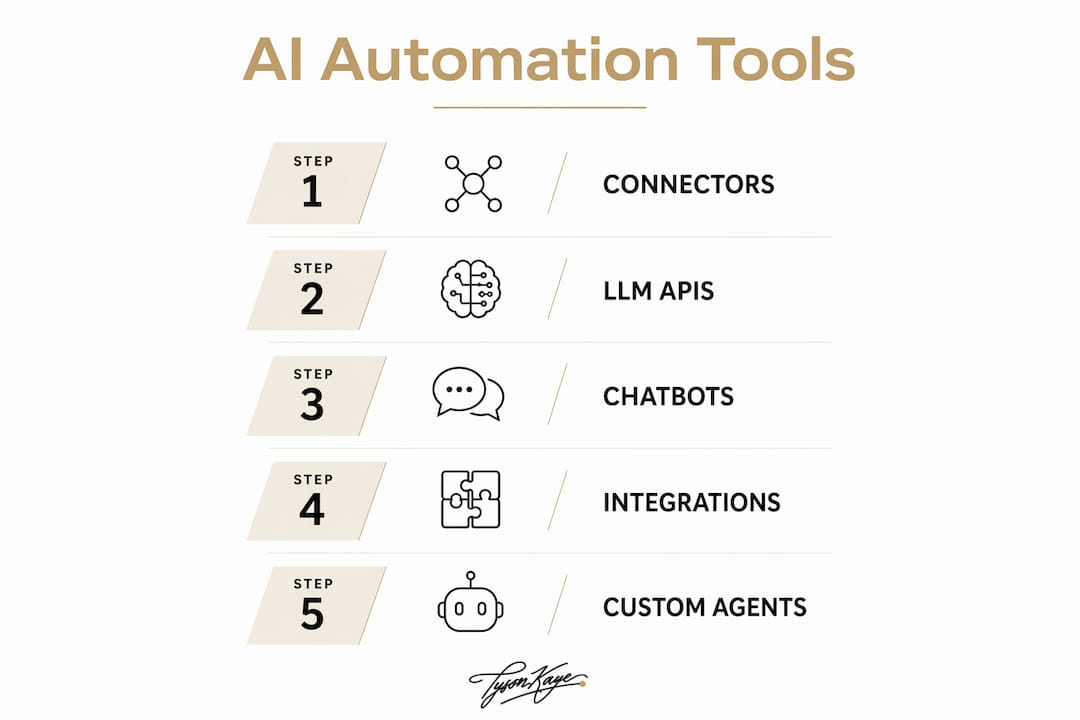
Integration platforms are connectors: Zapier, Make (formerly Integromat), and Microsoft Power Automate. Zapier connects with more than 9,000 apps and provides templates that let non-technical owners build automations quickly. Make offers more complex branching logic at a lower price point. Power Automate suits businesses already on Microsoft 365. Data sits on the vendor's cloud servers, so check their data-residency settings.

LLM and API platforms include OpenAI (GPT-4o and above), Anthropic's Claude, and Google Gemini. Claude for Small Business offers a one-click install plugin with pre-built connections to QuickBooks, HubSpot, Google Workspace, and Microsoft 365. These platforms process data on overseas servers by default; review their data processing agreements in light of your Privacy Act obligations.
Bot and chat interfaces sit on your website or inside messaging tools. They handle first-response triage, appointment booking, and FAQ deflection. Technical skill required is low-to-medium; the main configuration task is writing the prompt and connecting it to your calendar or CRM.
RPA-lite and process automation tools replicate repetitive screen-based tasks: copying data between systems, generating reports, or sending scheduled notifications. Microsoft Power Automate covers most of this for Microsoft shops.
CRM automation and invoicing/OCR tools close the revenue loop. Automated invoice processing using OCR can reach high accuracy rates for standard document types, cutting manual data entry in accounts receivable. Pair this with CRM automation to trigger follow-up sequences the moment an invoice is sent or a lead form is submitted.
Automation does not replace judgement. It removes the repetitive work that prevents your team from exercising it. The businesses that get the most from AI tools are the ones that automate the routine and protect the human touchpoints that actually win clients.
How do you choose the right tools or decide to build custom agents?
Work through this checklist before committing to any platform or vendor.
Integration fit
- List every app your business uses daily (CRM, accounting, calendar, email, booking tool).
- Confirm the automation platform connects to all of them natively, not just via a generic webhook.
- Check whether the data fidelity is sufficient: does the connector pass all fields, or just a summary?
Skills and maintenance
- Identify who will own the automation after launch: updates, prompt tuning, and monitoring.
- If no one internally has that capacity, factor ongoing support into the cost comparison.
ROI and time to benefit
- Ask vendors for a specific time-to-first-value metric, not a vague "quick setup" promise.
- Request a trial on your actual data, not a demo environment. Task automation across sales, marketing, accounting, and support produces measurable efficiency gains, but only when the tool connects to live workflows.
Questions to ask any vendor or integrator
- Where is customer data stored, and can you select an Australian or Asia-Pacific region?
- What encryption standards apply in transit and at rest?
- What is the rollback process if an automation produces errors?
- What are the SLA terms for downtime, and who is liable for data loss?
What does a phased rollout look like, and what will it cost?
Three phases cover the journey from first automation to a fully integrated custom agent.
Phase 1: Quick wins (weeks 1–4)
Connect your existing apps using templates in Zapier or Make. Typical automations: new lead to CRM, invoice sent to follow-up email, booking confirmed to calendar block. Technical skill required is low. Cost: platform subscriptions typically start from a few hundred dollars per year for small teams. This phase proves ROI before any significant investment.
Phase 2: Integrate and automate (months 2–3)
Add LLM-assisted workflows: email drafting, document summarisation, support triage. Google Workspace with Gemini or Claude's pre-built skills work well here. This phase also connects your accounting tool to automated invoice processing. OCR-based invoice tools can handle high volumes of standard documents with strong accuracy, reducing manual handling in accounts receivable. Budget for configuration time and a short testing period.
Phase 3: Bespoke agents and full system integration (months 3–6)
Custom AI agents for lead recovery, service diagnostics, or client onboarding require a bespoke build. One-click promises work for templates, but custom workflows need tuning to your business voice, compliance requirements, and customer nuances. Tyson Kaye's fixed-fee engagements for this scope typically range from $5,000 to $30,000+ depending on complexity.
Client result: After integrated automation and systems work, Tyson Kaye clients have reported saving up to 20 hours a week in administrative time and growing organic traffic by over 205% within 90 days.
What compliance steps must Australian businesses take before deploying automation?
Australia's Privacy Act 1988 applies to any automated system that collects, stores, or processes personal information. The Australian Privacy Principles (APPs) set the baseline.
- Consent and purpose limitation. Collect only the data the automation needs, tell customers what it is used for, and do not repurpose it without fresh consent.
- Data residency. Confirm where vendor servers are located. Cross-border data transfers require you to take reasonable steps to ensure the overseas recipient handles data consistently with the APPs.
- Security controls. Require encryption in transit and at rest, role-based access controls, and audit logging from every vendor.
- Retention and deletion. Set automated deletion schedules for data you no longer need; do not let integrations accumulate personal data indefinitely.
- Vendor contracts. Include data processing clauses in every SaaS agreement that touches customer records.
- Staff training. Anyone who manages automations must understand what triggers a privacy obligation.
Pro Tip: Run a short privacy impact assessment before Phase 2. It takes two hours and surfaces the data flows that need a contract clause or a consent update before you go live.
When should you DIY, and when should you hire a systems integrator?
DIY works when the automation is template-based, the apps involved have native connectors, the data is not sensitive, and someone on your team has time to maintain it. Most Phase 1 work fits this description.
Hire a specialist when:
- The workflow crosses three or more systems and requires custom field mapping.
- The automation touches sensitive client data and compliance risk is real.
- You need a custom voice or diagnostic logic the AI must learn from your specific service context.
- No one internally can own ongoing prompt tuning and monitoring.
- The cost of errors (missed leads, incorrect invoices, compliance breaches) exceeds the cost of a professional build.
A systems integrator runs a structured engagement: discovery to map your current workflows, design to specify the logic, build and test against real data, handover with documentation, and ongoing optimisation. Tyson Kaye's model follows this pattern, with project scopes ranging from targeted automation fixes to full integrated system builds.
The question is not whether to automate. It is whether the automation you build will actually reflect how your business works, or whether it will create a new category of error you have to manage manually.
For businesses considering a specialist to build custom agents or digital assistants, bespoke AI product builders can also prototype specific components before a full integration engagement begins.
Key takeaways
For Australian service SMBs, the most effective approach combines off-the-shelf connectors for quick wins, LLM APIs for language tasks, and a specialist build for custom agents that reflect your actual workflows and compliance requirements.
| Point | Details |
|---|---|
| Start with connectors | Use Zapier or Make in weeks 1–4 to prove ROI before investing in custom builds. |
| Add LLM workflows in phase 2 | Claude or Gemini pre-built skills handle drafting, triage, and summarisation inside tools you already use. |
| Budget realistically | Custom agent builds range from $5,000 to $30,000+ depending on scope and integration depth. |
| Check compliance early | Run a privacy impact assessment before any automation touches customer data under the Privacy Act. |
| Tyson Kaye for bespoke builds | Clients report saving up to 20 hours a week and over 205% traffic growth after integrated systems work. |
What actually drives results in AI automation for service businesses
Most articles about the best AI automation tools for small business focus on the tools themselves. The tools are almost beside the point. What determines whether automation pays off is whether the underlying process is worth automating, and whether the system is built to match how the business actually operates, not how a vendor demo assumes it does.
The businesses that get the most from automation are not the ones with the most sophisticated stack. They are the ones that started with a single, painful, repetitive process, fixed it properly, measured the result, and then expanded. That discipline is harder than it sounds when every platform is promising transformation in a few clicks.
The hybrid approach works because it forces that discipline. Connectors and templates are cheap enough to test quickly. LLM layers add intelligence without requiring a developer. And bespoke agents, built by someone who has done it before, handle the workflows that actually differentiate a service business from its competitors.
How Tyson Kaye builds integrated systems that actually hold up
Most service businesses in NSW are not short of automation ideas. They are short of systems that connect properly, comply with Australian privacy requirements, and keep working after the initial setup.
Tyson Kaye's engagement model runs from diagnosis through to handover: map the operational leaks, design the integrated system, build and test against your real data, then hand it over with documentation your team can maintain. Projects range from $5,000 for targeted automation fixes to $30,000+ for full custom agent builds. Clients have recovered significant administrative time and seen measurable revenue impact from lead recovery systems alone.
If you are weighing whether to DIY or bring in a specialist, a scoped discovery call is the fastest way to get a clear answer. Book a discovery call with Tyson Kaye to map your current workflows and identify where automation will have the highest return.
Further reading and sources
- Zapier automation software review, Lindy — independent testing of automation platforms including connector counts and template libraries.
- Small business task automation tools, Forbes — practical overview of efficiency gains across sales, marketing, accounting, and support.
- Claude for Small Business, Anthropic — official documentation on pre-built skills, integrations, and implementation realities including timeline caveats.
- Google Workspace with Gemini for small business — Google's guide to embedded AI across Docs, Gmail, Sheets, and Drive.
- Zenith invoice automation and OCR solutions — finance workflow tooling and invoice processing for small businesses.
- Tyson Kaye client case studies — project outcomes including time savings and traffic growth from integrated automation builds.
This article is general information only and does not constitute legal, privacy, or professional advice. Confirm your obligations under the Privacy Act 1988 with a qualified adviser or the Office of the Australian Information Commissioner for your specific situation.