
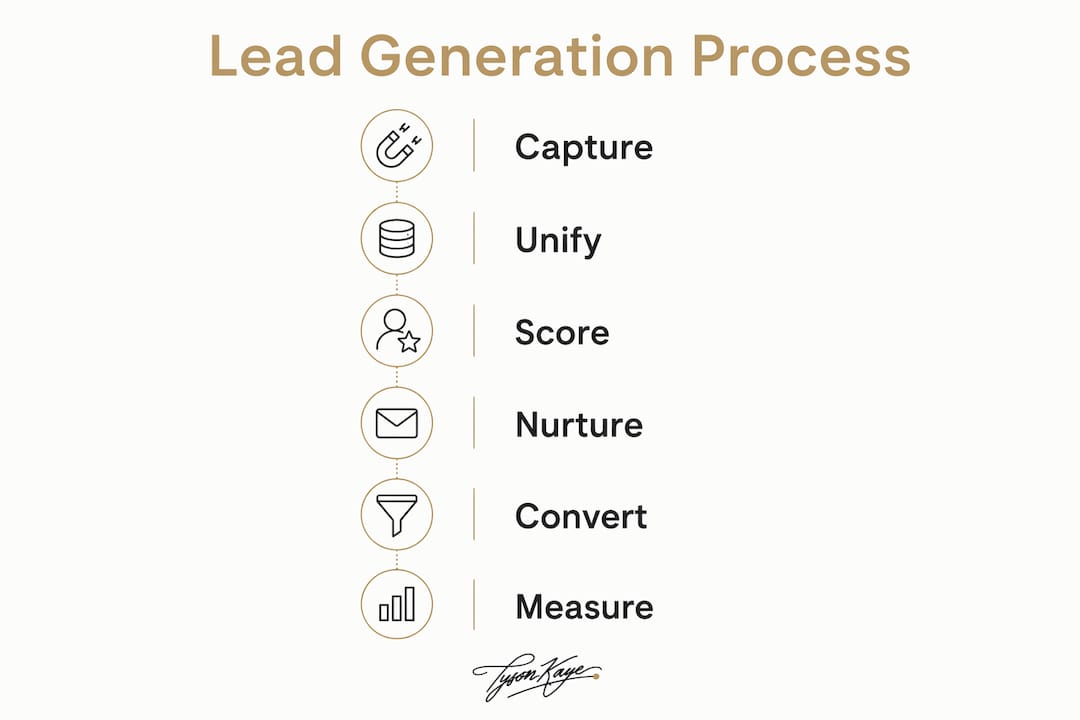
To automate lead generation, build a pipeline that moves prospects through six stages automatically: capture → enrichment → scoring → routing → nurture → analytics. Every stage needs a dedicated tool, and the whole system must comply with Australia's Australian Privacy Principles and the Spam Act 2003 before a single message goes out.
The seven components you need from day one:
- Lead capture: landing pages, embedded forms, live chat or chatbots
- Data enrichment: append company size, industry, and intent signals to raw form fills
- CRM: a single record per contact (HubSpot or Salesforce both work in Australia)
- Lead scoring: rules or AI that rank contacts by fit and behaviour
- Automation engine: workflow connectors such as Zapier or Make to move data between tools
- Outreach channels: email marketing automation, Google Ads, Meta Ads, and SMS
- Analytics: GA4 plus CRM reporting closing the loop
Automated funnels can reduce manual follow-up time and lift close rates materially compared with manual processes. The architecture below shows you exactly how to wire it together.
Table of Contents
- What does a working lead-generation system actually look like?
- Where does AI actually move the needle in lead generation?
- How to implement a lead-generation system in sprints
- Which tools should Australian service businesses actually use?
- How do you measure ROI from lead-generation automation?
- What compliance obligations apply in Australia?
- What results do real clients report?
- Should you build it yourself or hire a systems integrator?
- What Tyson Kaye builds for service businesses
- Key takeaways
- The part most guides skip
- Useful sources
What does a working lead-generation system actually look like?
Data flows in one direction: from capture sources into a single customer view, then out to sales or nurture sequences. Capture sources include site forms, chatbots, paid ads, and referrals. Each source pushes a raw record into your enrichment layer, which appends firmographic and intent data before writing a clean record to the CRM.

Unifying customer data is what makes hyper-personalised campaigns and accurate scoring possible. Without it, marketing and sales work from different lists and argue about lead quality.
Own your infrastructure. Owning your sending domains and API keys protects you if a vendor changes terms or suspends your account. Never build a campaign on a shared domain you do not control.
Common integration patterns:
- Native CRM integrations (HubSpot's form embed, Salesforce Web-to-Lead)
- Zapier or Make for connecting tools without custom code
- Direct API for high-volume or custom AI agent workflows
Minimal first-sprint checklist:
- One high-converting landing page with an embedded form
- CRM pipeline with a standard lead record template
- Basic enrichment (company name, industry, employee count)
- Two-rule lead score (fit score + engagement score)
- Three-email welcome nurture sequence
| Integration layer | Primary role | Key consideration |
|---|---|---|
| CRM (HubSpot / Salesforce) | Single customer view | Data residency; Australian servers available |
| Marketing automation (ActiveCampaign) | Email + SMS sequences | Spam Act 2003 consent fields required |
| Workflow connector (Zapier / Make) | Cross-tool data routing | Check API rate limits before scaling |
| Chatbot (ManyChat / Intercom) | Real-time lead capture | Map bot fields to CRM properties on day one |
| Analytics (GA4) | Funnel measurement | Link GA4 to CRM for closed-loop reporting |
Where does AI actually move the needle in lead generation?
AI embeds machine learning into every funnel stage to speed qualification and personalise follow-up. Four areas deliver measurable lift for service businesses:
- Predictive lead scoring: ranks contacts by conversion probability using behavioural signals, not just form-fill data
- Dynamic personalisation: adjusts email subject lines, landing page copy, and ad creative based on segment or intent
- Conversational lead capture: chatbots (ManyChat, Intercom) qualify visitors 24/7 and push structured data straight to the CRM
- Automated asset generation: AI generates copy and design assets that map directly into CRM records and site builders, rather than producing generic text you have to reformat manually
The limits matter as much as the capabilities. AI scoring is only as good as your Ideal Customer Profile (ICP) definition. Broad criteria mean the model surfaces low-value contacts and wastes credits. Treating any AI feature as set-and-forget invites automated spam and deliverability damage.
Pro Tip: Roll out one AI feature first, measure the lift over 30 days, then add the next. Predictive scoring is usually the highest-ROI starting point for service businesses.
How to implement a lead-generation system in sprints
A sprint-based build keeps scope tight and lets you validate before spending more.
- Discovery (weeks 1–4): Define your ICP, audit existing data, map your current tech stack, and identify the single highest-value capture point. Broad ICP criteria waste automation credits on low-fit leads — get this right before building anything.
- Prototype (weeks 5–12): Build the landing page, connect the CRM, write the welcome sequence, and run your first 50 leads through the pipeline manually to validate data quality.
- Iterate (weeks 13–24): Add lead scoring, enrichment, and a second outreach channel. Measure MQL-to-SQL conversion weekly.
- Scale (weeks 25+): Expand channels, introduce AI scoring, and automate reporting.
Budget bands for Australian service businesses:
- DIY (~$2,000–$5,000): Tool subscriptions (HubSpot Starter, ActiveCampaign, Zapier), landing page builder, and your own time. Suits businesses with an internal operator who can learn the stack.
- Mid-range build (~$5,000–$15,000): Adds integration hours from a freelance developer or small agency, custom forms, and basic AI agent setup.
- Bespoke integration (~$15,000–$30,000+): Custom AI agents, full CRM migration, multi-channel automation, and ongoing iteration support from a systems integrator like Tyson Kaye.
Pro Tip: Before spending on a mid-range build, run a two-week DIY prototype. The data you collect will sharpen the brief and cut integration hours significantly.
Which tools should Australian service businesses actually use?
The goal is a stack where every tool writes clean data to one CRM record. Prefer native integrations over connectors where possible; connectors add latency and failure points.
- CRM: HubSpot (free tier is genuinely useful; Australian data residency available on paid plans) or Salesforce (stronger for larger teams; higher implementation cost)
- Marketing automation: ActiveCampaign for email and SMS sequences; HubSpot Marketing Hub if you want CRM and automation in one platform
- Workflow connectors: Zapier for speed; Make (formerly Integromat) for complex multi-step logic
- Chatbots: ManyChat for Meta-channel lead capture; Intercom for site-based qualification
- Visitor identification: Leadfeeder-style tools that match IP-to-company and surface intent signals from anonymous site traffic
- Ads: Google Ads for high-intent search; Meta Ads for awareness and retargeting
- Analytics: GA4 linked to your CRM for closed-loop attribution
For organic lead capture, getting your on-page SEO elements right on landing pages and service pages is what turns search traffic into form fills.
| Tool role | Starter bundle | Mid-range bundle | Bespoke bundle |
|---|---|---|---|
| CRM | HubSpot Free | HubSpot Starter | Salesforce or HubSpot Pro |
| Automation | ActiveCampaign Lite | ActiveCampaign Plus | HubSpot Marketing Hub |
| Connector | Zapier Free | Zapier Pro | Make + custom API |
| Chatbot | ManyChat Free | ManyChat Pro | Intercom |
| Analytics | GA4 | GA4 + CRM reporting | GA4 + BI dashboard |
Pro Tip: Choose vendors that let you own your sending domain and export your full contact list at any time. Vendor lock-in is the most common and most expensive mistake service businesses make.
How do you measure ROI from lead-generation automation?
Track six KPIs from week one:
- Lead volume (total new contacts per week)
- MQL-to-SQL conversion rate (marketing qualified to sales qualified)
- First response time (target: under five minutes for inbound)
- Lead-to-booked-call rate
- Cost per qualified lead
- Hours saved per week on manual follow-up
A simple ROI calculation: if automation costs $800/month in tool subscriptions and saves 15 hours of admin at $80/hour, the time saving alone covers the cost. Add one extra booked call per month at a $3,000 average deal value and the return is clear.
Measurement windows matter. Expect data noise in the first 30 days. By day 60 you should see a trend in MQL-to-SQL conversion. By day 90 you can make a confident decision about which channels and sequences to scale.
What compliance obligations apply in Australia?
Australian service businesses face two primary frameworks: the Australian Privacy Principles (APPs) under the Privacy Act 1988, and the Spam Act 2003.
Common pitfalls:
- Vague ICPs that trigger mass outreach to unqualified contacts
- Scraping contact data without a lawful basis under the APPs
- Sending commercial electronic messages without explicit consent
- Using shared sending domains that damage deliverability for all users
- Automating outreach with no human review of replies
Compliance checklist:
- Add an explicit consent checkbox to every lead capture form (Spam Act 2003 requirement)
- Include a clear unsubscribe mechanism in every commercial message
- Store personal data on servers with known data residency (check your CRM vendor's Australian data centre options)
- Keep an audit trail of consent timestamps and source
- Use double opt-in for cold outreach sequences
- Own your sending domain and authenticate it with SPF, DKIM, and DMARC records
Pro Tip: For complex data-sharing arrangements with third-party enrichment vendors, get a short written opinion from a privacy lawyer before you go live. The OAIC can issue fines for APP breaches.
This article is general information, not legal advice. Confirm your specific obligations with a qualified privacy or legal professional.
What results do real clients report?
Tyson Kaye's methodology follows four stages: operational diagnosis → prioritised roadmap → build → iterate. Each engagement starts with a systems audit before any tool is purchased or workflow is built.
Clients using this methodology have reported saving significant hours per week in administrative time and achieving substantial organic traffic growth within a few months.
Three client outcomes worth noting:
- MS Accountants: Integrated CRM, automated follow-up sequences, and lead recovery systems reduced manual admin and improved lead-to-client conversion
- Lava Virtual: Automation of onboarding and outreach workflows freed the team from repetitive manual tasks
- Roman Building Services: Missed-call recovery and automated quote follow-up captured revenue that was previously falling through the cracks
The pattern across all three: the biggest gains came from fixing the gap between lead capture and first human contact, not from adding more traffic.
Should you build it yourself or hire a systems integrator?
Decision checklist:
- Do you have 10+ hours per week to learn and build the stack? If no, hire.
- Is your CRM data clean and structured? If no, start with a data audit before building anything.
- Do you need custom AI agents or complex multi-system integrations? If yes, hire.
- Is your budget under $5,000? DIY is viable with off-the-shelf tools.
- Do you need it running within 60 days? A good integrator will be faster than a DIY build.
Questions to ask any systems integrator:
- Who owns the CRM data and sending domains after the engagement ends?
- What is your process for handing over documentation and training the internal team?
- How do you handle ongoing maintenance and iteration after the initial build?
- What is your pricing model — fixed fee, retainer, or hourly?
- Can you show a case study from a similar service business in Australia?
If the integrator cannot answer the data-ownership question clearly, walk away.
What Tyson Kaye builds for service businesses
Most service businesses do not have a traffic problem. They have a conversion and follow-up problem, and no system to fix it.
Tyson Kaye designs and builds bespoke integrated systems — custom AI agents, CRM automation, lead recovery workflows, and premium websites — specifically for Australian service businesses that want leads converting to booked revenue without adding headcount. Engagements run from $5,000 for a focused sprint to $30,000+ for a full bespoke build, and every engagement starts with a systems diagnosis so you know exactly what to fix before a dollar is spent on tools.
Book a discovery call to get a clear picture of where your current system is leaking leads and what it would take to fix it.
Key takeaways
A fully automated lead-generation system for a service business requires six connected stages, the right tool stack, and continuous measurement — without those three elements, automation creates noise, not revenue.
| Point | Details |
|---|---|
| Start with ICP and data audit | Define your Ideal Customer Profile before building any workflow to avoid wasting credits on low-fit leads. |
| Own your infrastructure | Control your sending domains and API keys so a vendor change cannot halt your campaigns. |
| Measure at 30/60/90 days | Expect noise in the first month; MQL-to-SQL trends become reliable by day 60. |
| Comply before you send | Every capture form needs explicit consent under the Spam Act 2003 and APPs before outreach begins. |
| Tyson Kaye for bespoke builds | For service businesses needing custom AI agents and full-stack integration, Tyson Kaye delivers diagnosis-first engagements from $5,000. |
The part most guides skip
The automation tools are not the hard part. HubSpot, ActiveCampaign, Zapier — they all work. The hard part is the 48 hours of thinking that has to happen before you touch a single tool: who exactly is the right client, what does their decision process look like, and where in your current workflow are leads going quiet?
Every business I have seen struggle with automation struggled for the same reason: they built the system before they understood the problem. They connected the tools, wrote the sequences, and then wondered why the pipeline was full of contacts who never converted. The answer was always upstream — a vague ICP, a landing page that attracted the wrong traffic, or a nurture sequence that assumed the lead already trusted them.
The sprint approach exists precisely to force that thinking early. A two-week discovery phase feels slow when you want results. It is the reason the build phase actually works.
Useful sources
- AI sales funnel — monday.com: AI capabilities and funnel stage acceleration
- Lead generation guidance — Salesforce: Single customer view and data unification for scoring
- HighLevel — AI funnel guidance: Integrated asset generation mapping into CRM and site builders
- Automated sales funnel — Digistore24: Conversion benchmarks and the case for continuous monitoring
- How to automate lead generation — Gumloop: Five-step workflow and ICP-first methodology
- LeadSlicer: Infrastructure ownership and sending domain best practice
- Leadfeeder: Visitor identification and intent-signal enrichment
- On-page SEO for B2B sites — TheWebTeam: Landing page and organic lead capture optimisation
- Australian Privacy Principles — OAIC: Primary compliance reference for Australian data handling