
Scheduling, data entry, invoice processing, and inbox triage are the four admin tasks that return the fastest payback when automated. Target these first and most teams recover a significant number of hours per employee per week. Two things to do right now: spend 30 minutes listing every task your team repeats more than three times a week, then pick one workflow to pilot within the next 48 hours.
- Quick audit: write down every task that is high-volume, repeatable, and rule-based. These are your candidates.
- Pick one pilot: choose the single most painful repeating task and commit to automating just that one first.
The Office of the Australian Information Commissioner (OAIC) and Digital NSW both publish guidance on responsible automation for Australian organisations. Tyson Kaye applies this same framework when building systems for service businesses across New South Wales.
Table of Contents
- Which admin tasks are worth automating first?
- What does your business actually gain from automating repetitive tasks?
- A five-step roadmap to automate an admin workflow safely
- Which tools work in Australia and what does each one do best?
- How automation removes admin in specific Australian sectors
- Key risks and an Australian compliance checklist
- What Tyson Kaye's clients actually achieved
- Key takeaways
- The part most guides skip
- What Tyson Kaye builds for service businesses
- Useful sources
Which admin tasks are worth automating first?
Tasks ideal for automation share three traits: they happen frequently, follow a predictable pattern, and do not require human judgement to complete. If a task could be described as a flowchart with no branching decisions, it belongs on your automation list.
Tasks that qualify:
- Scheduling and calendar management (booking confirmations, reminders, rescheduling)
- Inbox triage and templated email replies
- Data entry and CRM record updates
- Invoice creation, approval routing, and expense processing
- Weekly report generation and data aggregation
- Meeting notes, action item capture, and follow-up emails
- File naming, sorting, and archiving
- Staff onboarding document distribution and checklist tracking
A simple way to prioritise these is a frequency-versus-complexity grid. Plot each task on two axes: how often it occurs (daily beats weekly beats monthly) and how complex it is (rule-based beats judgement-heavy). Tasks in the high-frequency, low-complexity quadrant are your quick wins. Tasks that are infrequent or require nuanced decisions sit in the "keep-human" zone.
| Task | Frequency | Complexity | Priority |
|---|---|---|---|
| Calendar booking confirmations | Daily | Low | Quick win |
| Invoice generation | Weekly | Low | Quick win |
| Weekly report compilation | Weekly | Low–Medium | Quick win |
| Inbox triage and templated replies | Daily | Low | Quick win |
| Staff performance reviews | Monthly | High | Keep human |
| Board-level financial decisions | Ad hoc | Very high | Keep human |

One important caveat: sensitive HR matters, board decisions, and anything involving personal health data should stay human-in-the-loop. Automation handles the volume; people handle the judgement.
What does your business actually gain from automating repetitive tasks?
The headline benefit is time, but the downstream effects matter just as much. Fewer manual steps means fewer transcription errors. Faster processing means clients hear back sooner. Staff freed from data entry can focus on billable work.
Key benefits:
- Time recovered: common workflows typically save 5–20 hours per employee per week
- Error reduction: rule-based automation removes the copy-paste mistakes that plague manual data entry
- Faster client response times: automated inbox triage and lead follow-up cut response windows from hours to minutes
- Reduced burnout: repetitive cognitive load is one of the leading causes of staff disengagement
- Lower cost per transaction: automating invoice processing, for example, reduces the labour cost attached to each invoice cycle
KPIs worth tracking from day one:
- Hours saved per week (measure before and after the pilot)
- Error rate on processed records
- Lead response time (minutes from enquiry to first reply)
- Cost per transaction for invoicing or data entry workflows
- Percentage of capacity reallocated to billable or strategic work
Benchmark to set expectations: small service businesses running their first automation pilot typically recover several hours per week per staff member on targeted workflows. Mid-sized teams with more complex stacks often see larger gains once integrations mature across CRM, accounting, and communications.
For a small professional services firm in New South Wales, recovering even five hours per week per person translates directly into capacity for client work. That is the number to take to a business case conversation.
A five-step roadmap to automate an admin workflow safely
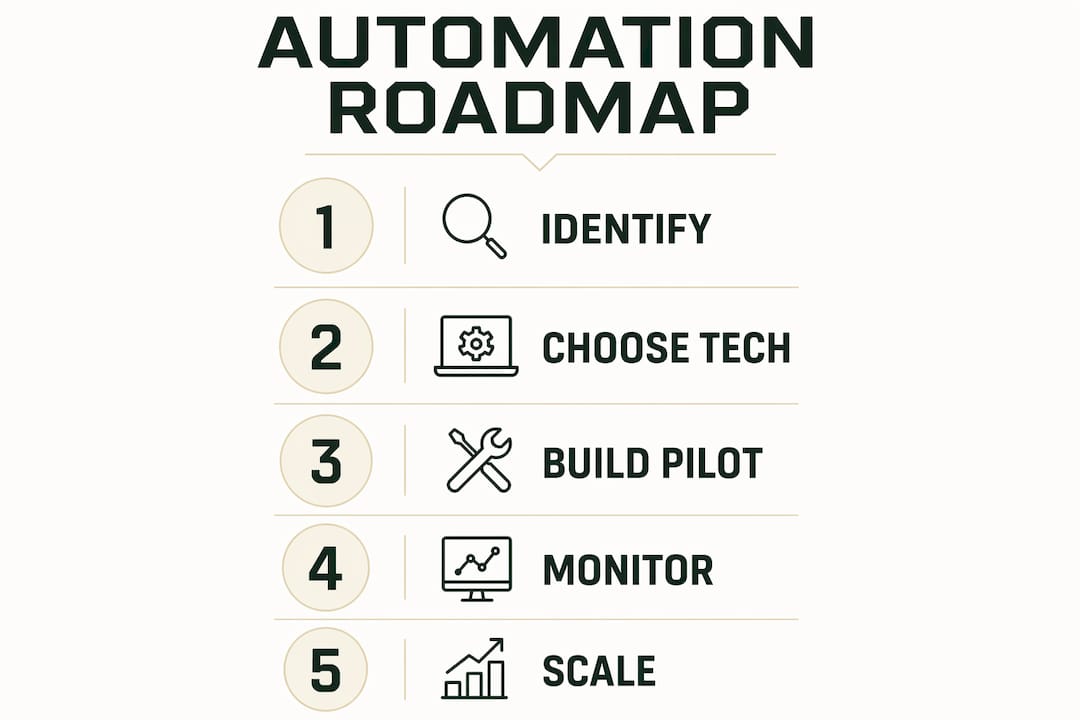
The five-step process used by most successful automation projects runs: identify and audit, choose technology, build and test a pilot, monitor, then scale. The order matters. Teams that skip straight to building a tool before auditing the task usually automate a broken process and make it faster at being broken.
Step 1: Identify and audit List every candidate task with its frequency, owner, and estimated time cost. Rank by time-cost multiplied by frequency. The top three are your pilot candidates.

Step 2: Choose technology that fits your stack Match the tool to the task type, not the other way around. A no-code connector like Zapier or Make suits simple app-to-app triggers. Microsoft Power Automate fits teams already in the Microsoft 365 ecosystem. UiPath suits desktop-heavy or legacy-system workflows. Custom AI agents suit complex, multi-step processes.
Step 3: Build and test a small pilot Scope the pilot tightly: one workflow, one owner, a four-week window. Define acceptance criteria before you start: accuracy threshold (e.g., 98% correct records), time saved versus baseline, and exception rate. Measure pilots with pre-defined criteria and keep a single owner accountable for monitoring and escalation.
Step 4: Monitor accuracy and KPIs Run the pilot in parallel with the manual process for the first two weeks. Compare outputs. Log every exception. If the error rate exceeds your threshold, pause and fix before expanding.
Step 5: Scale and govern Once the pilot passes acceptance criteria, extend to the full workflow and document the governance rules: who can modify the automation, how exceptions are escalated, and how often the workflow is reviewed.
Pilot timeline:
| Week | Milestone |
|---|---|
| 1 | Audit complete, acceptance criteria defined, tool selected |
| 2–3 | Pilot built and running in parallel |
| 4 | Review against acceptance criteria |
| 5+ | Scale or iterate based on results |
Typical costs for a small pilot range from near-zero (using existing Microsoft 365 licences) to a few thousand dollars for a custom build. A full integrated project with Tyson Kaye typically runs $5,000–$30,000+ depending on scope and the number of systems involved.
Pro Tip: Automate the task, not the exception. If a workflow has more than two or three edge cases that require human judgement, it is not ready to automate. Fix the process first, then automate it.
Which tools work in Australia and what does each one do best?
Australia has no shortage of capable platforms. The question is matching the right tool category to the right task type.
Tool shortlist:
- Microsoft Power Automate: best for teams in the Microsoft 365 ecosystem; handles cloud flows, desktop RPA, and document processing with over 1,400 prebuilt connectors
- Zapier: no-code triggers between web apps; ideal for simple, linear integrations (e.g., form submission creates a CRM record and sends a confirmation email)
- Make (formerly Integromat): more flexible than Zapier for multi-branch logic; suits teams comfortable with visual workflow builders
- UiPath: enterprise-grade RPA for desktop and legacy systems; requires more technical setup but handles non-API applications that other tools cannot reach
- Lapu AI: a desktop AI assistant that reads local files, drives desktop apps, and automates multi-step workflows across files, web portals, and spreadsheets without needing APIs
- Copilot Cowork: Microsoft's orchestration agent that plans and executes multi-step work across email, meetings, and files, pausing for human approval at sensitive checkpoints
- Custom AI agents: built to spec for complex, multi-system workflows where off-the-shelf tools hit their limits; this is Tyson Kaye's primary offering for service businesses
Tool comparison:
| Category | Ideal task types | Ease of use | Integration fit | Cost model | Scalability | Security controls |
|---|---|---|---|---|---|---|
| No-code connectors (Zapier, Make) | Simple app-to-app triggers, form routing | No-code | Strong for SaaS stacks | Per-flow / subscription | Moderate | Vendor-managed; check data residency |
| RPA / desktop flows (Power Automate, UiPath) | Legacy apps, desktop automation, document processing | Low-code to developer | Broad; 1,400+ connectors (Power Automate) | Per-seat / licence | High | Audit logs, access control, on-premise option |
| Orchestration agents (Copilot Cowork) | Multi-step cross-app workflows, approvals | Low-code | Deep Microsoft 365 integration | Microsoft 365 licence | High | Human-in-the-loop checkpoints, enterprise controls |
| Desktop AI agents (Lapu AI) | Local file processing, web portals, spreadsheets | No-code | Works without APIs | Subscription | Moderate | Local processing; no cloud upload required |
| Custom AI agents (Tyson Kaye) | Complex multi-system workflows, CRM + accounting + comms | Done-for-you | Built to your stack | Project-based | High | Designed to Australian Privacy Principles |
For Australian operations, data residency is a practical concern. Check whether your chosen platform stores data in Australian or Asia-Pacific data centres. Microsoft Azure has Australian regions; confirm your Power Automate environment is provisioned there. For sensitive documents, desktop agents that process files locally avoid the cloud-upload question entirely.
When connecting communication platforms to automation workflows, tools that handle community and collaboration data can simplify how messages and notifications feed into your broader system.
How automation removes admin in specific Australian sectors
Healthcare and aged care A GP clinic running manual appointment reminders spends 2–3 hours per day on outbound calls and SMS. Automating reminders via a calendar integration cuts that to near-zero and reduces no-shows. For aged care providers, shift scheduling across multiple care workers is a coordination nightmare; automated scheduling tools that check availability, send confirmations, and flag conflicts handle the volume without a dedicated coordinator. The Gentle Care Nursing case file shows how this plays out in practice for an aged care client. Health data sensitivity means any tool used here must comply with the Australian Privacy Principles and, where applicable, the My Health Records Act.
HR and professional services HR teams spend significant time on onboarding paperwork: sending contracts, chasing signatures, creating system accounts, and distributing induction materials. Automating the document distribution and checklist tracking step alone recovers hours per new hire. For professional services firms, automated billing triggers (time-tracking system hits a threshold, invoice is generated and sent) remove the end-of-month scramble entirely.
Small service businesses A tradie or consultant who misses a lead enquiry after hours loses the job. An automated missed-call text-back, combined with a CRM record creation and a follow-up sequence, means no lead falls through the gap. This is the highest-ROI automation for most small service businesses in New South Wales.
Construction and trade services Quote follow-ups, job scheduling confirmations, and supplier order tracking are all high-frequency, rule-based tasks. Automating these frees site managers to focus on the work, not the paperwork. The Roman Building Services case file illustrates the operational improvement possible for a trade services business.
Key risks and an Australian compliance checklist
Automation introduces new failure modes. The most common are data leakage from misconfigured integrations, incorrect automated decisions applied at scale, brittle workflows that break when an upstream app changes its interface, over-reliance on a single vendor, and auditability gaps where no one can reconstruct what the automation did and when.
Compliance checklist for Australian organisations:
- Confirm your automation platform stores data in Australian or Asia-Pacific data centres, or processes it locally
- Map every data flow against the Australian Privacy Principles (APPs) under the Privacy Act 1988
- Obtain consent before automating any process that handles personal information
- Build redaction rules for sensitive fields (health data, financial data, identity documents)
- Maintain audit logs for every automated action, especially in regulated industries
- Apply role-based access control: not every staff member needs to modify an automation
- Conduct vendor due diligence: review the security certifications of every platform in your stack
- Review Digital NSW automation guidance if your organisation operates in or alongside NSW government services
Automated decisions that affect individuals — credit assessments, leave approvals, performance flags — must have a human review step. The Australian Privacy Principles do not prohibit automated decision-making, but they require transparency and a mechanism for individuals to seek review. Build the human checkpoint into the workflow design, not as an afterthought.
For data extraction from messaging and communication apps, verify that the extraction method does not inadvertently capture personal information outside the scope of the original consent.
RPA and desktop flows are useful for legacy systems but require governance and monitoring to stay reliable. A workflow that runs unattended for months without a review cycle will eventually break silently. Schedule quarterly reviews as part of your governance calendar.
What Tyson Kaye's clients actually achieved
Three client projects show what measured outcomes look like in practice.
MS Accountants faced a manual client onboarding process that consumed hours of admin time per new client. Tyson Kaye designed and built an integrated onboarding system connecting their CRM, document signing, and communications stack. The result was a repeatable, near-touchless onboarding flow. Full details are on the MS Accountants case file.
Roman Building Services needed to recover missed leads and reduce the time spent on quote follow-ups. The automated system built for them included a missed-call recovery sequence and a CRM-integrated follow-up workflow. Operational admin time dropped materially, and no enquiry fell through after hours. See the Roman Building Services case file for the full picture.
Lava Virtual achieved over 205% growth in organic traffic within 90 days as part of a broader systems build that included automation of their lead capture and follow-up processes. The Lava Virtual case file covers the methodology and outcomes.
Across all three, results were measured against a pre-automation baseline: hours spent on specific tasks, lead response times, and error rates on processed records. That baseline measurement is what makes the ROI claim credible rather than anecdotal.
Key takeaways
Automating high-frequency, rule-based admin tasks is the fastest way for Australian service businesses to recover productive hours and reduce errors at scale.
| Point | Details |
|---|---|
| Start with quick wins | Target daily, rule-based tasks first: scheduling, inbox triage, invoicing, and data entry. |
| Measure before and after | Define acceptance criteria (accuracy, time saved, exception rate) before the pilot begins. |
| Match tool to task | Use no-code connectors for simple integrations; RPA or custom agents for complex, multi-system workflows. |
| Comply with Australian Privacy Principles | Map every data flow against the APPs and confirm data residency before deploying any platform. |
| Tyson Kaye builds to spec | Custom AI agents and integrated systems designed for service businesses, with projects typically ranging from $5,000 to $30,000+. |
The part most guides skip
Most automation advice treats tools as the answer. Pick the right platform, follow the five steps, done. But the projects that fail almost always fail for the same reason: the underlying process was broken before automation touched it, and automation just made the broken process run faster.
The highest-value work in any automation project is the audit, not the build. Sitting down with the people who actually do the task and mapping every step, every exception, every workaround they have quietly built into their day. That is where the real inefficiency lives, and it is invisible until someone asks.
The second thing most guides understate is change management. Staff who feel like automation is being done to them, rather than built with them, will route around it. They will keep the manual spreadsheet running alongside the new system "just in case." The pilot never fully takes hold. The fix is simple: involve the people doing the task in the design, show them what the automation handles and what it does not, and give them a clear escalation path for exceptions. Training does not need to be a formal programme. A 30-minute walkthrough and a one-page reference card is usually enough.
Tyson Kaye builds every system with this in mind. The same integrated workflows used in client projects run in the business itself, which means every edge case has already been encountered and handled before a client sees it.
What Tyson Kaye builds for service businesses
Recovering 20 hours a week from admin is not a promise most consultants can back with evidence. Tyson Kaye can, because the same systems built for clients run in the business itself.
The offering covers the full build: diagnosis of where admin time is leaking, design of the integrated system, and implementation across CRM, AI agents, workflow automation, and lead recovery. Projects are fixed-fee and scoped to your situation, typically ranging from $5,000 for a focused pilot to $30,000+ for a full systems build across multiple workflows.
For service businesses in New South Wales that are losing hours to manual data entry, missed leads, or end-of-month invoice chaos, this is the practical next step. See what a full build looks like or review the MS Accountants case file for a concrete example of what the process produces.
Useful sources
- Microsoft Power Automate — official platform documentation covering cloud flows, desktop RPA, and governance controls; the primary reference for enterprise automation in Microsoft 365 environments.
- Copilot Cowork — Microsoft's orchestration agent for multi-step workflows across email, meetings, and files; useful for understanding human-in-the-loop approval design.
- Lindy: AI for Administrative Tasks — practical breakdown of which admin tasks are best suited to AI automation and real-world use cases.
- Asana: Automate repetitive tasks — five-step framework for task automation with change management and adoption guidance.
- Lapu AI for Office Workers — desktop AI assistant documentation; relevant for local file processing and non-API automation use cases.
- Digital NSW Automation Guide — NSW Government guidance on responsible automation; essential reading for organisations operating in or alongside government services.
- Office of the Australian Information Commissioner (OAIC) — primary source for the Australian Privacy Principles and Privacy Act 1988 obligations relevant to automated data processing.
- MS Accountants case file — Tyson Kaye client project showing integrated onboarding automation and measurable outcomes.
- Roman Building Services case file — trade services client example covering lead recovery and operational workflow automation.
- Lava Virtual case file — client project with quantified traffic and lead automation outcomes over a 90-day period.