
Australian service businesses should pilot at least one AI agent for a high-volume admin workflow this quarter. The evidence is clear: businesses using AI agents for business automation report saving up to 20 hours a week on repetitive tasks, and the Australian government has co-funding pathways that can reduce your net investment significantly. Before you scale anything, you need one workflow, one owner, and a measurable baseline.
Quick orientation for decision-makers:
- Start small: pick one repetitive workflow (lead qualification, appointment scheduling, or invoice processing) and run a 2–6 week pilot
- Measure from day one: track hours saved per week and error rate against a pre-pilot baseline
- Know your compliance obligations: the Australian Privacy Principles (APPs) govern how personal information is handled by any AI system you deploy
- Check your funding options: the AI Adopt Program offers co-funding for eligible SMEs; the R&D Tax Incentive may offset qualifying development costs
Table of Contents
- What are AI agents, and how do they differ from chatbots and RPA?
- What types of AI agents suit different parts of your business?
- Where do Australian businesses see the fastest ROI?
- What does it cost, and how long does implementation take?
- How do you run a phased implementation without blowing the budget?
- What governance and privacy rules apply to AI agents in Australia?
- What should you do this week and this month?
- Real results: what Tyson Kaye clients have measured
- Is this right for your business, and what do you do next?
- Key takeaways
- The part most guides skip
- What Tyson Kaye builds for Australian service businesses
- Useful sources and further reading
What are AI agents, and how do they differ from chatbots and RPA?
An AI agent is autonomous, goal-driven software that reasons through a problem, decides which tools or APIs to call, and takes action to complete a task without step-by-step human instruction. That last part is what separates agents from the two technologies they are most often confused with.
A chatbot responds to prompts. It does not initiate, plan, or execute multi-step tasks on your behalf. A traditional RPA bot follows rigid, rule-based scripts to click through interfaces, which works well for stable, structured processes but breaks the moment a screen layout changes or an unstructured document arrives. AI agents, by contrast, adapt. They handle unstructured inputs, recover from unexpected states, and can call external services to complete a goal. Business process automation is evolving toward this kind of intelligent, adaptive automation, often called hyperautomation, precisely because rule-based tools hit a ceiling.
When to choose which:
| Scenario | Best fit |
|---|---|
| Answer FAQs, handle simple queries | Chatbot |
| Copy-paste data between stable screens | RPA |
| Qualify leads, draft quotes, triage tickets | AI agent |
| Coordinate multiple specialised tasks end-to-end | Multi-agent orchestrator |
Pro Tip: Ground your agents in your own internal data using retrieval-augmented generation (RAG) rather than relying on a model's general knowledge. Connecting agents to your CRM, accounting system, or document store gives them institutional memory and dramatically reduces the risk of hallucinated outputs.
What types of AI agents suit different parts of your business?
Understanding the main agent types helps you match the right tool to the right problem, rather than buying a platform and hoping it fits.
-
Conversational agents handle inbound enquiries, qualify leads, and answer client questions using your business's own knowledge base. Primary integration: CRM and live chat. Best for SMEs with high inbound volume and stretched front-of-house staff.
-
Task/execution agents take a goal (schedule an appointment, generate an invoice, send a follow-up) and complete it end-to-end. Primary integration: calendar, accounting software, and email. This is where most service businesses see the fastest payback.
-
Research/insight agents pull data from multiple sources, synthesise it, and surface a recommendation. Primary integration: data warehouse or internal document store. More useful at enterprise scale, though smaller firms with complex quoting can benefit.
-
Voice agents handle inbound phone calls, capture intent, and route or resolve without a human picking up. Primary integration: telephony platform and CRM. Particularly valuable for trades and field-service businesses that miss calls during site hours.
-
Orchestrator/multi-agent systems coordinate a network of specialised sub-agents: one researches, one drafts, one logs the result. Best practice is to have a coordinating agent delegate to these specialists, which improves reliability and makes the whole system easier to monitor. This pattern suits enterprise workflows or complex cross-departmental processes; it is overkill for a first pilot.
Visual builders like n8n combine deterministic workflow nodes with AI agent nodes and built-in human-in-the-loop (HITL) steps, making them a practical starting point for SMEs that want to test an agent idea without a full engineering team.
Where do Australian businesses see the fastest ROI?

The highest-value use cases for service businesses are not the flashiest ones. They are the workflows that consume the most staff hours for the least strategic value.
Lead qualification pays back fastest because speed-to-response is directly tied to conversion. An agent that contacts a new enquiry within minutes, asks qualifying questions, and books a discovery call removes the single biggest drop-off point in most service funnels. Integration points: web form, CRM, calendar.
Appointment scheduling eliminates the back-and-forth that costs a surprising amount of time across a week. For an accounting practice managing BAS appointment cycles, an agent that checks availability, sends confirmation, and follows up on no-shows can free a full day per week for admin staff.
Invoice processing is where automation of routine tasks yields measurable time savings in finance. An agent that reads incoming invoices, matches them to purchase orders, flags discrepancies, and queues approved items for payment reduces both processing time and error rate.
Quote generation for trades and field-service businesses is underutilised. Roman Building Services, a Tyson Kaye client, used workflow automation to improve scheduling, quoting, and job management, turning a manual, error-prone process into a consistent system.
Client onboarding and basic IT ops triage round out the top six. Onboarding agents collect documents, send welcome sequences, and populate your CRM without a staff member touching each step. IT triage agents categorise and route support tickets, reducing mean time to resolution for common incidents.
What does it cost, and how long does implementation take?
Costs vary by complexity, but the ranges below reflect typical Australian engagements for service businesses.
| Phase | Typical duration | Indicative cost range |
|---|---|---|
| Assessment and scoping | 1–2 weeks | Included in project fee or — |
| Pilot (single workflow) | a few weeks | moderate cost typical for a scoped pilot |
| Production rollout | a few weeks to several months | cost varies widely depending on scope |
| Ongoing runtime and model costs | Monthly | costs depend on API usage and hosting |
Key cost drivers to understand before you budget:
- Integrations: connecting to legacy systems or poorly documented APIs adds time and cost
- Data cleaning: agents are only as good as the data they retrieve; messy CRM data or unstructured document stores require preparation work
- Governance controls: audit logging, HITL approval gates, and access controls add build time but are non-negotiable for production
- Model API costs: usage-based pricing from model providers scales with volume; factor this into your ongoing budget
Two Australian funding pathways can reduce your net outlay. The AI Adopt Program offers co-funding for eligible businesses adopting AI; check current eligibility and round status at business.gov.au. The R&D Tax Incentive may apply where your implementation involves genuine experimental development; confirm eligibility with your tax adviser via the ATO's guidance.
How do you run a phased implementation without blowing the budget?
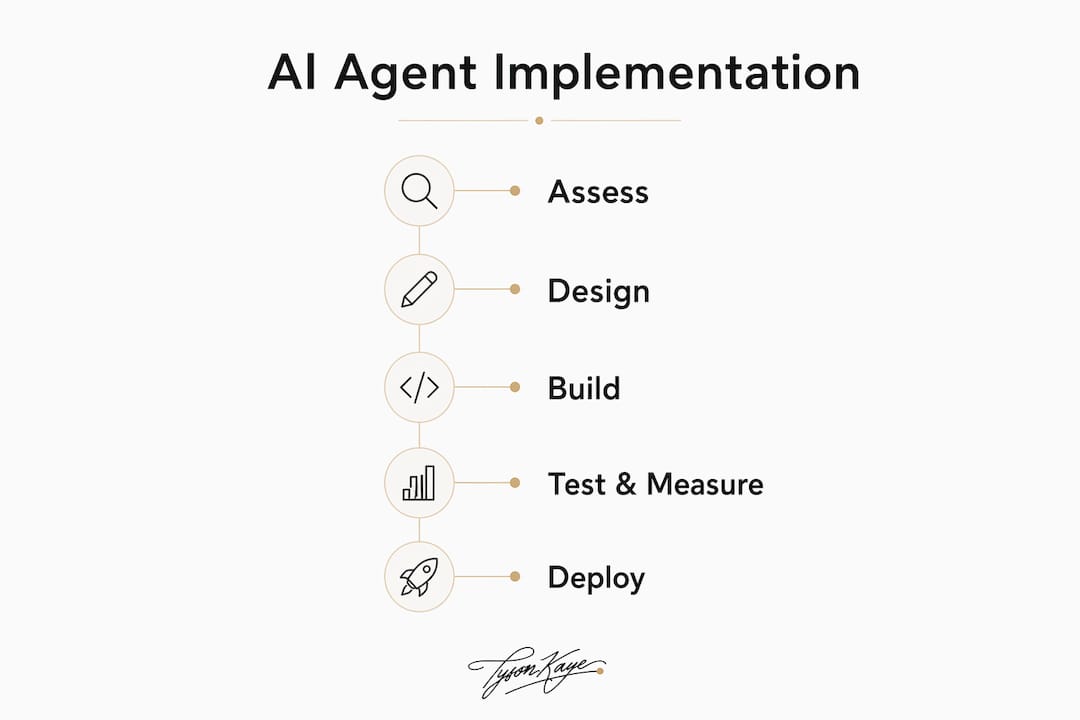
A strategic BPM approach beats a standalone tool rollout every time. Organisations that embed agents into a formal process management framework get better monitoring, clearer ROI, and a path to continuous improvement. Here is how that looks in practice.
Phase 1: Assess (weeks 1–2). Map the candidate workflow end-to-end. Identify the data sources the agent needs, the systems it must connect to, and the humans who currently own each step. Set your baseline metrics now: how many hours does this take per week, what is the current error rate, what does it cost?
Phase 2: Design (weeks 2–3). Define the agent's scope precisely. What can it decide autonomously? What requires human approval? Document the approval gates, the rollback plan if the agent fails, and the confidence threshold below which it escalates to a person.
Phase 3: Build (weeks 3–8). Connect integrations, set up retrieval grounding if the agent needs to query internal documents, and configure HITL controls. For financial or customer-facing actions, require human sign-off above a defined threshold before any irreversible transaction executes.
Phase 4: Test and measure (weeks 6–10). Run the agent in parallel with the existing process. Track: hours saved per week, tasks automated, error rate, user satisfaction score, and cost per automated task. Compare against your baseline.
Phase 5: Scale. Once the pilot KPIs are met, extend the agent to adjacent workflows or higher volumes. Operationalise monitoring and set a review cadence.
Minimum viable pilot checklist:
- Single workflow selected with a named owner
- One primary data source connected and cleaned
- Approval gate(s) configured for sensitive actions
- Rollback plan documented and tested
- Measurement baseline recorded before go-live
What governance and privacy rules apply to AI agents in Australia?
The Australian Privacy Principles under the Privacy Act 1988 apply to any system that collects, uses, or discloses personal information. If your agent handles client names, contact details, health information, or financial data, you have obligations around collection notice, use limitation, data quality, and security.
Core compliance points to address before production:
- Cross-border disclosures: if your agent sends data to a model provider hosted overseas, APP 8 requires you to take reasonable steps to ensure that provider protects the information to an equivalent standard
- Special category data: health, financial, and biometric data carry heightened obligations; minimise what the agent processes and what it stores
- Data retention: define and enforce retention limits; agents that log every interaction can accumulate sensitive data quickly
Vendor contract checklist:
- Data residency options (Australian region available?)
- Security certifications (ISO 27001, SOC 2 Type II)
- Audit logs retained for how long, and accessible to you?
- Incident SLA and notification obligations
- Right to audit and right to delete
- Clear roles: who is the data controller, who is the processor?
Enterprise platforms position observability, identity, and auditability as core requirements for production agent deployments, not optional extras. Treat them the same way.
Pro Tip: Minimise PII exposure by using RAG to retrieve only the specific document chunks an agent needs, rather than sending full datasets to a third-party model. Scoped agent identities with least-privilege access reduce your blast radius if something goes wrong.
What should you do this week and this month?
This week:
- Pick one high-volume, repetitive workflow that a capable staff member currently handles manually
- Name an internal owner who will be accountable for the pilot
- Pull three months of sample data from that workflow to understand volume, variation, and edge cases
This month:
- Write a one-page pilot scope: workflow boundaries, success metrics, integration requirements, and budget ceiling
- Request quotes from two or three implementation partners; use the vendor questions below
- Check AI Adopt Program eligibility and confirm whether your project qualifies for R&D Tax Incentive treatment
Vendor questions to ask in any proposal:
- Which integrations do you support natively, and what is the cost for custom connectors?
- Where is data stored, and can you offer an Australian-region deployment?
- How are audit logs structured, and can we access them independently?
- What HITL controls are configurable, and at what threshold?
- What is your rollback and error-handling process if the agent produces a wrong output?
- What training and handover do you provide to our internal team?
Red flags to walk away from:
- Opaque or usage-based pricing with no cap and no usage dashboard
- No audit logs, or logs you cannot access without raising a support ticket
- Vendor unwilling to limit which data the model trains on or retains
- No exit plan or data portability commitment in the contract
Real results: what Tyson Kaye clients have measured
The following outcomes come from Tyson Kaye client engagements. Results are measured against pre-implementation baselines using automated tracking and client reporting.
| Client | Business type | Problem solved | Measured outcome |
|---|---|---|---|
| MS Accountants | Accounting practice | Manual scheduling and admin overhead | Reduced admin load; system-driven appointment and workflow management |
| Lava Virtual | Virtual services | Lead conversion and admin time | Measurable time savings and improved lead-to-booking conversion |
| Roman Building Services | Trades/field service | Quoting, scheduling, and job management | Consistent quoting process; scheduling and job management automated end-to-end |
Key patterns across these engagements:
- Every project started with a diagnostic phase to identify the specific operational leak before any build began
- Measurement baselines were set before go-live so outcomes could be compared against real prior performance, not estimates
- Human approval gates were retained for client-facing communications and financial actions throughout the pilot period
Is this right for your business, and what do you do next?
Pilot now if you run a service business with repetitive admin: scheduling, quoting, lead follow-up, invoicing. These workflows have clear inputs and outputs, which makes them easy to measure and fast to show ROI. Expect to see measurable time savings within 4–8 weeks of a well-scoped pilot.
Prepare first if your data is in poor shape. An agent built on a messy CRM or inconsistent document store will produce inconsistent outputs. Spend a month cleaning and structuring your primary data source before you build anything.
Wait if your business operates in a highly regulated space (financial advice, healthcare) and you have not yet resolved your governance and compliance framework. The agent itself is not the risk; deploying it without proper audit controls and APP compliance is.
Three immediate next steps:
- Pick the workflow: one process, one owner, a documented baseline
- Secure pilot budget: $5,000–$12,000 covers a well-scoped first agent; check AI Adopt Program co-funding before committing your full budget
- Engage an implementation partner: look for fixed-fee scoping, not open-ended hourly billing, and ask for local case studies with measured outcomes
Key takeaways
AI agents deliver the clearest ROI for Australian service businesses when deployed against a single, high-volume admin workflow with a measured baseline, a defined owner, and HITL controls in place from day one.
| Point | Details |
|---|---|
| Start with one workflow | Pick lead qualification, scheduling, or invoicing for your first pilot; these show results fastest. |
| Budget realistically | Pilot engagements typically run $5,000–$12,000; production rollouts reach $12,000–$30,000+. |
| Comply with APPs | Any agent handling personal information must meet Australian Privacy Principles obligations, including cross-border disclosure rules. |
| Use available funding | The AI Adopt Program and R&D Tax Incentive can reduce your net investment; check eligibility before committing budget. |
| Tyson Kaye | Offers fixed-fee diagnosis, design, and implementation of AI agents for Australian service businesses, with measured outcomes from local client engagements. |
The part most guides skip
Most AI agent content focuses on capability: what agents can do. The harder question is what they should do first, and how you know it worked.
The businesses that get the most out of intelligent automation are not the ones that deploy the most agents. They are the ones that pick the right first workflow, set a real baseline before they start, and resist the urge to scale before the pilot is proven. A 20-hour-per-week saving sounds impressive until you realise it was measured against an inflated estimate rather than actual logged time.
There is also a tendency to underestimate data readiness. An agent connected to a well-structured CRM with clean contact records and consistent tagging will outperform a more sophisticated agent connected to a chaotic one. The technology is rarely the bottleneck. The data and the process definition almost always are.
The governance piece is where Australian businesses are most exposed right now. APP compliance is not optional, and the cross-border disclosure obligations under APP 8 catch a lot of businesses off guard when they realise their chosen model provider hosts data in the US or EU. Sort that before you build, not after.
What Tyson Kaye builds for Australian service businesses
Twenty hours back per week is not a marketing claim. It is a measured outcome from a real client engagement, confirmed by Tyson Kaye clients, and is achieved by fixing one system at a time—not deploying a dozen tools at once.
Tyson Kaye designs and builds custom AI agents and automated workflow systems for Australian service businesses, with fixed-fee engagements that run from approximately $5,000 for a scoped pilot to $30,000+ for a full production build with CRM integration, lead recovery, and ongoing measurement. Every project starts with a diagnostic session to identify where your operation is actually losing time and revenue, not where it looks like it might be. The same systems run in-house, so what gets built for clients has already been tested under real conditions.
If you are ready to scope a pilot or want to see what a real implementation looks like, view the case studies or book a discovery session directly. No open-ended retainer, no vague roadmap: a fixed scope, a clear outcome, and a measurement plan from day one.
For businesses that need finance workflow automation as part of their integration, Zenith's plug-and-play finance workflows are worth reviewing as a complementary layer.
Useful sources and further reading
- AI Adopt Program — business.gov.au: official co-funding programme for Australian businesses adopting AI
- R&D Tax Incentive — ato.gov.au: ATO guidance on eligible R&D activities and offset rates
- Business process automation — Red Hat: practical overview of BPA, RPA, and BPM distinctions
- n8n AI agents platform: visual agent builder with HITL controls and broad integration support
- OpenAI Frontier enterprise platform: enterprise agent deployment with business context and access controls
- Gartner Peer Insights — Business Process Automation Tools: peer reviews of enterprise BPA platforms
- Tyson Kaye — AI agents and automation services: local implementation partner with published case studies and fixed-fee engagements
- MS Accountants case file: accounting practice automation example
- Roman Building Services case file: field-service scheduling and quoting automation example